Hey! Just wanted to clarify with you: if I put my UV map in there that I created somewhere else, it 'puts it together' or like I can put it together for a full object and it generates a rotated sprite sheet?
Not sure if I understand your question... Sorry. If you import an ortho image Uv (one sprtie front) it will create a flat geometry... After this, if u upload a side image, the program will interpolate both images and find matching pixels to create the 3d model on volume... The third image (top) can define missing geometry constraints.
Alternatively you can upload directly a 6 sprites image (using any upload button) and it creates the whole geometry at one shot.
You can mix any images to see the results, try the online version and test it by yourself. (up on this page).
I did update the Linux version; now both versions (arm and x86) are included in the zip file.
Let me know if it works for you and if u experience any bugs. At the moment, I do not have a way to playtest those versions. Long time I did not use Linux, but Im big fan of this Os. Many Thanks. :I)
Great tool, can be a massive timesaver for making car animations.
However, when I try to import a predrawn sprite from all angles I can't seem to find a way to import the back or under view (like in the ambulance example).
Am I missing an option / hotkey or is it not possible?
My best approach (out of my tests) is to start the model with just importing 2 or 3 images. From there u can get of the most needed models... After I export as ortho image and work on Photoshop or Aseprite the rest of the missing textures on the Ortho exported image, before reimporting this file back into the app... Is it possible to import this ortho image (6 sprites) using any upload button. Also, if u prefer, you can paint the missing textures using the PixZels app if u prefere. I do like beter to work on Photoshop. Many Thansk PixelHenkie :)
Hello George Rahmanenko. You are right! :( at current build is not possible to export as 40 degrees.. The slider snaps too early... Many thanks for the info, I will fix it next build. :)
The current exe file is not the portable version desired?
This tool is great to create asstes... but organic shapes like mushroms are difficult to setup.. XD Working on some ideas for it.
I’m having an issue with the Linux version. I’m on Linux Garuda and cannot launch the app. Gear Lever says ‘it may not be compatible with your system architecture’ whatever that means.
Yes for sure... Atm Im still looking for precision and perfection for this tool.. But when I got a nice complete build I will launch it into Steam. Many Thanks Alavi.
The core of Pixzels is a dedicated voxel engine with some specific tricks to accomplish a real pixel art feeling. The model is not real Voxels but similar tech. Atm the export options are 2d pixelart (power of 2) sprites usable for any game engine. As a pixelartist if I export as 3d obj it would lose all the pixelart feeling that I was looking for this tool. Working still on it, I might include 3d export on the future updates,... Not sure yet. Many Thanks Fluffy Sheferd. :)
Hi! I found your program on itch.io and it looks really great. I just wanted to ask: are you planning to release it on Steam in the future, and if so, will itch.io buyers receive a Steam key? I’m mainly asking because I’d prefer to have it on Steam
As a pixelartist myself I suffered a lot of the Adobe high prices for artist tools :( ... That is not my intention, I do want my tool to be afforable for artists like me, So, when I will release on Steam I will point out to everybody that if they have been purchased the app on itch will have a Steam key... Not sure how can I do that to automate it, but I will find the way... Many Thanks.
Hello Arnoi. I did not know that RPG MAker uses 48x48... Many thanks for pointing that out. I defenetly will add this feature to export options on next update. I point that out, Thanks.
Great app! Do you have plans for adding importing a back/bottom image? It would be really cool. I see you wrote a comment below, but I don't see Load button for 6-view sprite sheets.
You can upload a png with 6-view spritesheet (see example) using any of the 3 UpLoad buttons on the grid. The program detects each side automatically but the sprites need to be set up like this:
To get a Sprite file like this perfect, I suggest to build the model within 2-3 images (easiest) and export the Ortho Png to get this file if u want to modify it on Photoshop or Aseprite.
Just wanted to say I'm already loving the new update! Fast and really versatile with the new ability to change the angle of the export. Really appreciate the work you're doing here, and for accepting feedback.
The fact that its working so well and this is only the beginning has me pumped to see what new upgrades to this you'll put into overtime.
Hey there! I’ve been trying to make use of this and I can successfully import front/side/top both individually and from a sprite sheet but how do I import a back?
When you upload a png with 6-view spritesheet (see example) using any of the Load buttons, the app automatically generates a 3D model with six colored sides based on those sprites.
(Note: You can download 16-32-64-128 template examples from the Downloads section to use as a base for your own designs.)
Why this workflow? Through extensive testing, I found that modeling from only 2 or 3 sides is often the most effective approach. Creating perfectly aligned, pixel-precise orthographic images for all six sides is difficult; even minor misalignments between views can distort the final 3D model.
By starting with 2 or 3 sides and then painting the remaining details directly within the app, you avoid these projection errors. If you prefer using external tools like Aseprite or Photoshop, you can export the model created by 2 sides only using the orthographic PNG from the app. This exported sheet is already perfectly aligned for all six views, ensuring that when you re-upload your finished paintwork, the model remains structurally perfect.
First, I am really excited to see it being developed further as it has so much potentieal and I already can see many ways in which I personally could use it.
However, in its current form I find this program extremely frustrating to use to the point where I don't want to touch it until some changes are made.
First thing, and the most frustrating im my opinion - camera snaping to sides. This feature makes the program practically unusable for me, as I have to fight the program to move the camera to where I want it to be and not constantly snaping to random places. This feature alone made me rage quit this program.
Second thing, and this is more of a request, I make pixelart characters that consist of multiple different parts that are drawn on different layers, which in classical 2d art makes it realy convenient to draw complex sprites without getting lost. I would want to know if it is possible to make layering system in this program as well, it would be realy convenient to have it.
Third, and last thing, is the camera position in the output sprite sheet. As I saw someone before mentioning it - this is quite limiting in which scenarios this tool can be used, as not every game (assuming you are making sprites for game) has top-down or slightly from above perspective. I, for example, at the moment am working on couple of character sprites that are drawn from side perspective, and as such makes this program quite usless for my purposes.
All in all, I see huge potential for this program if you decide to develop it further and definitely am going to pay closer attention to its development. Good luck to you!
Yes the program is currently on developement, as a pixelartist workign hard currently to deliver a precise tool for artists.
The camera snapping should be easier to use, I think it is good to have snapping because the model will be exported mainly in those angle views. But I'm working on a better workflow.
Layering system will be added as a normal pixelart program is needed, yes, Thx.
I have already worked out a system to export the model at any desired angle, so the user can export as Top_Down, side view or any random angle view.
The ultimate goal is to create a nice and precise pixelart tool where users can paint-model keeping the pixelart painting feeling.
Sweet program, I like how it is but there is a lot of room for improvement.
What I like. It simple to get a hang of the concept. There is an in app pixel art editor.
Lot of rough things that I like but needs work for sure.
I like you can upload photos for the main angles but I think it could help to have alternative angles (say common types being 3/4th view for example) Maybe also different left and right angles? That's my main wish! :)
The UI is rather clunky and crashed my graphics drives when streaming on discord (That was weird! Not 100% what caused that but a thing to keep an eye out for.) I think the 3d type tools (selection for example) could benefit from some gimbals! As just using the section edges is a bit of a guessing game of where it is.
I think lastly, two last things. There should be an option for it to not be in full screen and there should be a light mode. Dark mode hurts my eyes as I have contrast issues.
I defenetly need to work more on the Ui... I would need to add a settings menu to adjust windowed mode (had some requests about).
I will take a look at the Discord streaming. That is a important bug thanks to point out that.
About uploading 3/4th view images ... Im not sure how I can pull it out.. Atm Pixzels works by aligning top and side planes, the tool calculates exactly where pixels meet in 3D space to create the model. Delivering a image with prespective Im not sure if the app could extract the data correclty to extrude a 3d model. Interesting to test Thx.
The app is currently on developement and gathering data to make it good, sorry for the bugs, and many thanks for your support. On the roadmap to create a good pixelart tool.
Listed on my to do is work on digital Accessibility to have an inclusive design. I will add possibility for dark/light mode to start with inclusive.
This is amazing! Are there any plans to allow for exporting the 3D model as an OBJ? I’d love to know because I would switch to this in a heartbeat over MagicaVoxel!
Hello Cacklecave, atm as a pixelartist Im focus on deliver a perfect pixelart tool.. Not really focus on voxels. In fact this app is based on a kind of unique Voxel technology but to fully, to get this pixelart result is used a more combined technologies... In traditional voxel engines, a voxel is typically defined by a single set of data for the colour. PixZels uses 6 coloured side voxels. Need to test out and see how and what will be exported.
If I find it a time saver tool I will add it, atm do Im focus on make it perfect pixelart sprite tool.
I had your work as inspiration, also loved the work of @eddort_dev and @skurovec (on Voxels).
As a pixelartist working on isometric, I do not use Aseprite myself, I primarily work on Photoshop, When I saw your work and eddort work inspired me to make the pixelart painting tool that always dreamed about... with my particular pixelart approach and different building tools, a app that already is a massive time saver for my work.
Your work on Aseprite Plugin will be dope!. A Killing app for Aseprite users 😍. Waiting for it 😍 Easymetric:
i think a layer or component system would help with more complex objects. that way you could provide the front/side/top for multiple different components so they would be generated more accurately then have them all render together in the final product. instead of trying to create one complex object from one set of front/side/top
This tool is fantastic, thank you for your work! Could I leave a request to not start in fullscreen mode with hidden toolbar every time? I have a 32:9 monitor and usually have several windows open next to each other, especially when working on my game/art, and resizing the window requires several steps right now.
Might also be a Linux issue. I'm running on bazzite/KDE.
I would love to be able to control the angle for the export as well as the amount of frames, right now you already render the whole thing but only exporting it at one angle limits what it can be used for heavily
Yes interesting... As pixelartist I always work on isometric pixelart 2:1 (26 Tilt) and I dind´t thought that users would need diferent angles... Of coures I will be thinking of a way to export to any desired angle.
For the amount of frames I think 4-8 angle diretions is what is more used on pixelart... sometimes 16 directions for smoth rotation, but not really much used. That was my original idea.
I have something i made using your software if you would like to display it, this is a new account so i can't post it here, iv added you on Bluesky, if you shoot me a message on there i can show you what i'm trying to use your tool for and why it would be very powerful for people who work in a similar style to me
Hay i saw this not too long ago and love! really exited to see how this develops, right now im not understanding how to move selected objects, and copy past does not seem to be working for me, would love to have that working :) also being able to have this it in window mode would be amazing!
Many thanks for your feedbacl Wholesomegomi. -When u have a selection (make sure the selection has some pixels inside) Shift+Drag mouse: Move pixels. Control+Drag mouse: Copy pixels.
Im working to create a nicer user experience.. Working hard on updates, Many thanks.
Could this program import stuff from voxels? It seems like you can technically make a 3D pixel art with it placing every cube one by on (Really tedious on win because of the hard snapping of the camera) Also I would love to have a larger zoom since when you select one pixel sized column you have to rotate the camera every time you want to fill the selected column.
Also having a customizable key binding for the looks (Maybe on numpad or wherever) would be sooooo comfortable. :)
Super cool.. Organic shapes aren´t the best for this program, at least atm, Im trying characters to see how can I improve this app.
-Many thanks for your feedback. Definitely I will relex the snapping view scape, yes.
If u go to views (S SW W...) and u press right left arrows you can actually rotaete the view with the keyboard... I might do the same for Front side top...
Yes, although the app is based on voxels.. Is not using normal Voxel technology, where each individual voxel holds a single color value. In Pixzels this "voxels" hold 6 colored individual faces. So I´m not sure how could be importing Voxel into PixZel. Defenetly I will try out.
I love this, and have enjoyed the web version since I found it. However, I exclusively use Linux, and emulating the purchased version via Wine results in a significant portion of menus not having any text render. A temporary solution might be for me to download and install the font, if it's available for download somewhere. However, if you could begin compiling it for linux as well it'd be greatly appreciated!
Thanks so much! I just downloaded and installed it. All the text is showing as it should, I believe.
The only errors I ran into were it hanging on trying to close the app, and the "Clear All" button requiring me to press it twice to work. If you'd like, I can send videos if I'm able to reproduce it. Otherwise, this is exciting. Thanks so much!
I am using windows, played around with it for a bit and have a few observations
when i click export or save as json I get two save dialogs open.
it would be nice to have a button to change the orientation of the object without reuploading the front/top/side. like 'lay this on its back'
right click and drag doesnt change perspective unless i drag quickly which is really inconvenient. it seems the orientation snapping into position is too strong. in the web demo it seems more forgiving but in my windows app the snap is too strong and hard to rotate perspective.
it would be nice to have buttons to see back/bottom/otherside instead of just front/top/side
here is what i made so far, i tried to do a bow but the bow string was very difficult to make. https://imgur.com/a/pjHrIxU
Wow Aubro2.. Many thanks for your feedback, and for your art! U trully have a good eye on art tools :)
I take all atention at your requests and I add them to the list of to do. Definitely I will need to fix right-click snap (works great on mac ans web), buttons export and buttons missing views.. It´s really important to see what artists need, because I focus on things and I do not see other things.
I would be very happy for you to use it - i cleaned up the black line on the spine of the book and reuploaded the gif.
for what its worth this is the art I had that i was starting with. I used someone elses free 16x16 book and upscaled it for my game. the front view i uploaded had the proper X on the eyes but when it gets compressed to isometric the eyes struggle at a lot of angles. Is there a technique you use to make the isometric export angle look proper? i guess i could be pasting the fixed version in the isometric view? I added two new photos to the imgur album posted, one shows in the South view the eyes have an X but in the actual export the angle is slightly different so we just have the lines. this might be an export setting that i have wrong?
Many Thanks I reuploaded the book. ❤️ Based on your pictures.. Maybe the reason because are slightly different is because the book from Front image and the book on isometric there is a camera Tilt, to export the object as true isometric Top_Down. That angle changes prespective on the book illustartion. Looks great the book, love it :)
This is awesome! Love your work, bought immediately. Very keen to see how this evolves going forward. Top two things I'd love to see is the ability to upload a back image (I might have missed the option) and the ability to upload animation frames for each key angle. Would be awesome to have angles for animations automatically generated that would save SO MUCH TIME, I see the potential already
Hello joeychappel, thanks for your comment. :) On the program u can upload a 6 images sprites (Front, LSide, Back, RSide, Top and bottom) and the model will be more precisely created. In my experience it works best to upload just 2 or 3 images, to create the model, which already creates most of the needed 3d models, within the program u can adjust the geometry and colour at any angle. You can export ortho images sprites and go to photoshop or ur desired program to work there if u wish, and upload again into PixZels to export the sprites. It is best to start with 2 images beacause is not easy to precisely coordinate a orthogonal model using 6 projections, the pixels must be very precisely placed, better let Pixzels make the work.
Hello! Not sure if you meant to reply to me or the person below, but that is a cool feature anyway and definitely what I meant by the first request :D
Just to clarify what I meant with my second point, is I mean it would be cool to be able to upload like 8 animation frames for the front, side and back (each) and have 8 different models be generated for each animation frame, would make animating isometric scenes a lot easier - at least give you frames that you could then edit and touch up later on. I'm sure that it isn't as easy as that, but could be cool to look into
Oh I got ur idea sorry :) Will be definitely cool to incorporate animation into the app... I need to think what the best approach will be. Many thanks.
Many thanks Lilred ❤️ For characters is not the best atm... There is couple of problems on characters that I need to figure it out how to solve... But the next versions of this app will be improved towards it.
This is amazing! Seeing the demo animation made me get it right away. I have tried it and it works pretty well but the snapping to the specific angles is sometimes a bit annoying. Is there a way to turn it off?
As a pixelartist this bug is really anoying also... I will refine more the app and find this bug. Sorry for it the app is on hard developement atm... Thanks :)
One thing I would love to have (And maybe it would be useful for others as well) if the middle click of the mouse could be pan when held down (Like in blender, illustrator, Aseprite and so on)
Not really.. I gather info from itch comments... I know this app so much because I tested a lot but I need people feedback, theis computer system, possible bugs, thoughts about the idea... Many thanks
Bought just to support--I'm still early on in my own pixeling journey, so I don't have a lot of use for this yet. That being said, I hope to be able to use this in the future! Keep up the good work
This is an amazing point in your pixelarting journey to get this tool. Since the program generates mostly boxy shapes it can help you a lot in understanding structures that will help you later on the manual drawing.
I've encountered a bug of some kind. Not sure if it's just an issue with the demo, and I'm not sure if it's the same on every canvas size, but I'm using a 16x16 canvas.
On certain zoom levels there are pixels that become impossible to colour in. The pencil tool acts as if they're not there (the colour preview isn't even visible when hovering over them).
If I slide the zoom level in and out I can sometimes hit a point where the pencil now recognises one of the "dead" pixels and I can colour it in.. So I'm having to constantly zoom in and out trying to find zoom levels to fill in the dead pixels.
True, many thanks... I encounter this bug also... Curently I use bucket tool to fill this gap, but it is very anoying... As a pixelartist is my main concern because I want a responsive tool. That is my #1st bug priority. Many thanks Sancosity. Hope to clean up this bug during this work week..
This was my experience in painting a 8x8 solid red circle. I could complete one side just fine but the 3D approximation would get real janky on either of the other sides
On my experience is good to work using selections (add deleted or paint pixels) to complete the model, because working using just images projected requires precision on the pixels to get the desired result.
Woah this looks really amazing. Loads of potential with this tool. Quick question, can you control the camera view for when you're exporting 8 directions or 16 direction angles?
I'm asking because I tend to experiment with fps and would like to match the angles of the 8 directional sprites for fps style games. The images you've shown look for more "top-down" or "isometric" angles and I was curious.
Still an amazing tool though. I'm not gonna lie I am impressed with what you've achieved this far and can't wait to see this grow as it updates.
Yes Interesting.. Thanks to point that out... At the moment there export 8 directions and 16 directions, but yes are isometric top Down... Also there is orthogrphic export (front sides back top and down)... that I used to reimport back to Pixzels to create the model... Also I added a random angle snapshot... But I did not thought about 8 directions orthographic... That would be really handy for models on pixleart to be rendered 8 diretions for a fps game... Same as Doom directional sprites rotation. Defenetly I will add this export on next future update... Thanks PsychoJack!
Hello pixel_Salvaje. Thanks for responding. Much appreciated for hearing me out and for considering the potential update. I think this is a really amazing tool.
Having played a lot of Doom and dabbled in some modding, this tool would perfectly fit right in the alley for those looking for an extremely handy toolset for sprite work that demand a lot of sprites of that nature.
As a possible hypothetical addition to the orthographic rotation, is it possible to also have it where you can get sprites from a top view orthographic? So if you wanted 8 direction sprites from a top or bottom view for those who want to really spice up their sprite work now that tools like this enable more faster workflows?
I'm asking because Doom style sprites look amazing and detailed, and those are only 8 directions in a 360° left to right fashion. But what about from the top or bottom view for those looking to incorporate sprites in more 3d environments, or those with more complex elevation or areas. Just something I have been thinking about with this, but feel free to tell me otherwise if its unrealistic in any way. I'm already happy to see a tool like this exist. It's the only one of its kind.
Once I have tried a rotation sprite doom system, including the top and down... After some days of work I could not get nice results... Player mostly sees the enemy from its sides... and when player see the enemy from top is too much of a change of sprite... Change sprites from each sides works good because are small variations changes... but changing sprites from side to top there is too much of a jump... I could not get nice results by myself... Maybe need to think more about.
Amazing tool! I wonder if the back image feature is included? Because you show only 3 images (Top, Front, Side), does the back image is included in the tool? Thank you Kenney.
Yes, the back image is taken into account when building the 3D model. Although a model can be constructed using only two or three orthogonal images with decent precision, I’ve found that using three specific views (Top, Front, and Side) is more practical and effective for avoiding mistakes instead of working all 6 orthogonal views.
Additionally, in Pixel Salvaje, I’ve ensured that if a user paints a back or bottom image after the initial model creation, those images are then integrated to refine the final 3D output.
← Return to PixZels
Comments
Log in with itch.io to leave a comment.
Hey! Just wanted to clarify with you: if I put my UV map in there that I created somewhere else, it 'puts it together' or like I can put it together for a full object and it generates a rotated sprite sheet?
Not sure if I understand your question... Sorry.
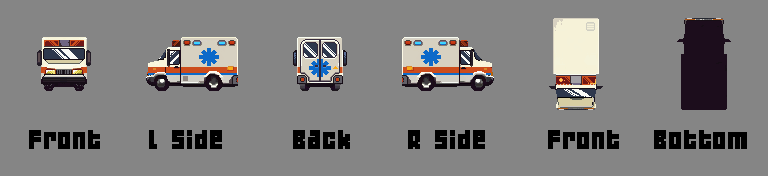
If you import an ortho image Uv (one sprtie front) it will create a flat geometry... After this, if u upload a side image, the program will interpolate both images and find matching pixels to create the 3d model on volume... The third image (top) can define missing geometry constraints.
Alternatively you can upload directly a 6 sprites image (using any upload button) and it creates the whole geometry at one shot.
You can mix any images to see the results, try the online version and test it by yourself. (up on this page).
Hi! I just purchased this and am attempting to run it on Arch Linux, but it appears the AppImage is only for ARM. Is there an x86 build?
Thanks!
Hello BlueLemming.
I did update the Linux version; now both versions (arm and x86) are included in the zip file.
Let me know if it works for you and if u experience any bugs. At the moment, I do not have a way to playtest those versions. Long time I did not use Linux, but Im big fan of this Os.
Many Thanks. :I)
It seems to work! Thanks a ton. I will be sure to report any bugs if I find any.
<3
Great tool, can be a massive timesaver for making car animations.
However, when I try to import a predrawn sprite from all angles I can't seem to find a way to import the back or under view (like in the ambulance example).
Am I missing an option / hotkey or is it not possible?
My best approach (out of my tests) is to start the model with just importing 2 or 3 images. From there u can get of the most needed models... After I export as ortho image and work on Photoshop or Aseprite the rest of the missing textures on the Ortho exported image, before reimporting this file back into the app... Is it possible to import this ortho image (6 sprites) using any upload button. Also, if u prefer, you can paint the missing textures using the PixZels app if u prefere. I do like beter to work on Photoshop.
Many Thansk PixelHenkie :)
Thank you for your swift response!
I just tried it out and while it's not the most intuitive way, it is indeed working so I'm very happy with that. :)
Again, great job on making this tool, it's already very impressive and a massive timesaver!
You are right :) Need to find a way to make it uploads more intuitive :) Thinking about.
Many thanks PixelHenkie :)
Magnificent!
Failed to draw a mushroom ;)
Don't really like installers, could you please make the portable exe ?
Also, can't set 40 degrees on export
Hello George Rahmanenko.
You are right! :( at current build is not possible to export as 40 degrees.. The slider snaps too early... Many thanks for the info, I will fix it next build. :)
The current exe file is not the portable version desired?
This tool is great to create asstes... but organic shapes like mushroms are difficult to setup.. XD Working on some ideas for it.
Many thanks for your feedback. :)
I’m having an issue with the Linux version. I’m on Linux Garuda and cannot launch the app. Gear Lever says ‘it may not be compatible with your system architecture’ whatever that means.
Hello Lau.
Can I contact you via Discord or mail? Lets find out what is the correct Linux version needed. Thx
Absolutely! My Discord is jibsjerky
Thanks for the help! :)
Amazing stuff, please bring it to Steam so we can auto update!
Yes for sure... Atm Im still looking for precision and perfection for this tool.. But when I got a nice complete build I will launch it into Steam.
Many Thanks Alavi.
Thank you, take your time! Best of luck.
Is it possible to support a timeline? Thank you.
What do you mean?
Amazing work! Just a quick question — are these real 3D models (like made in Blender and usable in a game engine), or are they more like voxels?
Thanks.
The core of Pixzels is a dedicated voxel engine with some specific tricks to accomplish a real pixel art feeling. The model is not real Voxels but similar tech. Atm the export options are 2d pixelart (power of 2) sprites usable for any game engine. As a pixelartist if I export as 3d obj it would lose all the pixelart feeling that I was looking for this tool. Working still on it, I might include 3d export on the future updates,... Not sure yet. Many Thanks Fluffy Sheferd. :)
Thanks for creating this! Keep up the good work!
What is this black magic! <3 <3 <3
<3
Just purchased, about to use. I know I'm going to love it. Freaking amazing work! I'd love to hire you if possible for some work.
Many Thanks Revpain :)
What game are you planning?
Would it be possible to chat on discord?
Hello Revpain :)
Yes sure, lets chat on Discord : efebe_
Hi! I found your program on itch.io and it looks really great. I just wanted to ask: are you planning to release it on Steam in the future, and if so, will itch.io buyers receive a Steam key? I’m mainly asking because I’d prefer to have it on Steam
Hello Furkanakkurt.
As a pixelartist myself I suffered a lot of the Adobe high prices for artist tools :( ... That is not my intention, I do want my tool to be afforable for artists like me, So, when I will release on Steam I will point out to everybody that if they have been purchased the app on itch will have a Steam key... Not sure how can I do that to automate it, but I will find the way... Many Thanks.
When upgrading 48x48 support for RPG Maker Projects?
Hello Arnoi. I did not know that RPG MAker uses 48x48... Many thanks for pointing that out. I defenetly will add this feature to export options on next update. I point that out, Thanks.
Hey Salvaje, just wanted to say thanks for this! Much like you, I work in isometric art a lot and this has been awesome so far. Am enjoying it a lot.
Many Thanks Jftshore :)
Looking to improve this app more.
Great app! Do you have plans for adding importing a back/bottom image? It would be really cool. I see you wrote a comment below, but I don't see Load button for 6-view sprite sheets.
You can upload a png with 6-view spritesheet (see example) using any of the 3 UpLoad buttons on the grid. The program detects each side automatically but the sprites need to be set up like this:
To get a Sprite file like this perfect, I suggest to build the model within 2-3 images (easiest) and export the Ortho Png to get this file if u want to modify it on Photoshop or Aseprite.
Just wanted to say I'm already loving the new update! Fast and really versatile with the new ability to change the angle of the export. Really appreciate the work you're doing here, and for accepting feedback.
The fact that its working so well and this is only the beginning has me pumped to see what new upgrades to this you'll put into overtime.
Many thanks pixel_Salvaje for this!
Many thanks Psychojack88 😍
Hey there! I’ve been trying to make use of this and I can successfully import front/side/top both individually and from a sprite sheet but how do I import a back?
When you upload a png with 6-view spritesheet (see example) using any of the Load buttons, the app automatically generates a 3D model with six colored sides based on those sprites.
(Note: You can download 16-32-64-128 template examples from the Downloads section to use as a base for your own designs.)
Why this workflow? Through extensive testing, I found that modeling from only 2 or 3 sides is often the most effective approach. Creating perfectly aligned, pixel-precise orthographic images for all six sides is difficult; even minor misalignments between views can distort the final 3D model.
By starting with 2 or 3 sides and then painting the remaining details directly within the app, you avoid these projection errors. If you prefer using external tools like Aseprite or Photoshop, you can export the model created by 2 sides only using the orthographic PNG from the app. This exported sheet is already perfectly aligned for all six views, ensuring that when you re-upload your finished paintwork, the model remains structurally perfect.
Many Thanks Aven for your Feedback.
Tried this program and I have few thisngs to say.
First, I am really excited to see it being developed further as it has so much potentieal and I already can see many ways in which I personally could use it.
However, in its current form I find this program extremely frustrating to use to the point where I don't want to touch it until some changes are made.
First thing, and the most frustrating im my opinion - camera snaping to sides. This feature makes the program practically unusable for me, as I have to fight the program to move the camera to where I want it to be and not constantly snaping to random places. This feature alone made me rage quit this program.
Second thing, and this is more of a request, I make pixelart characters that consist of multiple different parts that are drawn on different layers, which in classical 2d art makes it realy convenient to draw complex sprites without getting lost. I would want to know if it is possible to make layering system in this program as well, it would be realy convenient to have it.
Third, and last thing, is the camera position in the output sprite sheet. As I saw someone before mentioning it - this is quite limiting in which scenarios this tool can be used, as not every game (assuming you are making sprites for game) has top-down or slightly from above perspective. I, for example, at the moment am working on couple of character sprites that are drawn from side perspective, and as such makes this program quite usless for my purposes.
All in all, I see huge potential for this program if you decide to develop it further and definitely am going to pay closer attention to its development. Good luck to you!
Hello Arth_Arth.
Yes the program is currently on developement, as a pixelartist workign hard currently to deliver a precise tool for artists.
The camera snapping should be easier to use, I think it is good to have snapping because the model will be exported mainly in those angle views. But I'm working on a better workflow.
Layering system will be added as a normal pixelart program is needed, yes, Thx.
I have already worked out a system to export the model at any desired angle, so the user can export as Top_Down, side view or any random angle view.
The ultimate goal is to create a nice and precise pixelart tool where users can paint-model keeping the pixelart painting feeling.
Many thanks for your observations :)
Sweet program, I like how it is but there is a lot of room for improvement.
What I like. It simple to get a hang of the concept. There is an in app pixel art editor.
Lot of rough things that I like but needs work for sure.
I like you can upload photos for the main angles but I think it could help to have alternative angles (say common types being 3/4th view for example) Maybe also different left and right angles? That's my main wish! :)
The UI is rather clunky and crashed my graphics drives when streaming on discord (That was weird! Not 100% what caused that but a thing to keep an eye out for.) I think the 3d type tools (selection for example) could benefit from some gimbals! As just using the section edges is a bit of a guessing game of where it is.
I think lastly, two last things. There should be an option for it to not be in full screen and there should be a light mode. Dark mode hurts my eyes as I have contrast issues.
Many thanks for ur interesting Feedback Lexi.
I defenetly need to work more on the Ui... I would need to add a settings menu to adjust windowed mode (had some requests about).
I will take a look at the Discord streaming. That is a important bug thanks to point out that.
About uploading 3/4th view images ... Im not sure how I can pull it out.. Atm Pixzels works by aligning top and side planes, the tool calculates exactly where pixels meet in 3D space to create the model. Delivering a image with prespective Im not sure if the app could extract the data correclty to extrude a 3d model. Interesting to test Thx.
The app is currently on developement and gathering data to make it good, sorry for the bugs, and many thanks for your support. On the roadmap to create a good pixelart tool.
Listed on my to do is work on digital Accessibility to have an inclusive design. I will add possibility for dark/light mode to start with inclusive.
This is amazing! Are there any plans to allow for exporting the 3D model as an OBJ? I’d love to know because I would switch to this in a heartbeat over MagicaVoxel!
Hello Cacklecave, atm as a pixelartist Im focus on deliver a perfect pixelart tool.. Not really focus on voxels. In fact this app is based on a kind of unique Voxel technology but to fully, to get this pixelart result is used a more combined technologies... In traditional voxel engines, a voxel is typically defined by a single set of data for the colour. PixZels uses 6 coloured side voxels. Need to test out and see how and what will be exported.
If I find it a time saver tool I will add it, atm do Im focus on make it perfect pixelart sprite tool.
Many thanks for your feedbak :)
cool tool
Hello Oroshibu :)
I had your work as inspiration, also loved the work of @eddort_dev and @skurovec (on Voxels).
As a pixelartist working on isometric, I do not use Aseprite myself, I primarily work on Photoshop, When I saw your work and eddort work inspired me to make the pixelart painting tool that always dreamed about... with my particular pixelart approach and different building tools, a app that already is a massive time saver for my work.
Your work on Aseprite Plugin will be dope!. A Killing app for Aseprite users 😍. Waiting for it 😍 Easymetric:
https://x.com/Oroshibu/status/1930262532683399235?s=20
It would be an amazing feature if the user could paint on layer by layer.
Yes a layer system will be great, Thanks.
i think a layer or component system would help with more complex objects. that way you could provide the front/side/top for multiple different components so they would be generated more accurately then have them all render together in the final product. instead of trying to create one complex object from one set of front/side/top
Yes agree. :)
This tool is fantastic, thank you for your work! Could I leave a request to not start in fullscreen mode with hidden toolbar every time? I have a 32:9 monitor and usually have several windows open next to each other, especially when working on my game/art, and resizing the window requires several steps right now.
Might also be a Linux issue. I'm running on bazzite/KDE.
Many Thanks Thrakbad :)
I got some requests on that Windows mode. Considering adding a menu to allow fullscreen mode or windows mode.
do you have any plans to let you take export of other angles?
what specific angles are u intersested on?
I would love to be able to control the angle for the export as well as the amount of frames, right now you already render the whole thing but only exporting it at one angle limits what it can be used for heavily
Yes interesting... As pixelartist I always work on isometric pixelart 2:1 (26 Tilt) and I dind´t thought that users would need diferent angles... Of coures I will be thinking of a way to export to any desired angle.
For the amount of frames I think 4-8 angle diretions is what is more used on pixelart... sometimes 16 directions for smoth rotation, but not really much used. That was my original idea.
Many thanks for your imput wholesomegomi.
I have something i made using your software if you would like to display it, this is a new account so i can't post it here, iv added you on Bluesky, if you shoot me a message on there i can show you what i'm trying to use your tool for and why it would be very powerful for people who work in a similar style to me
WOw what a nice artwork wholesomegomi, Many Thanks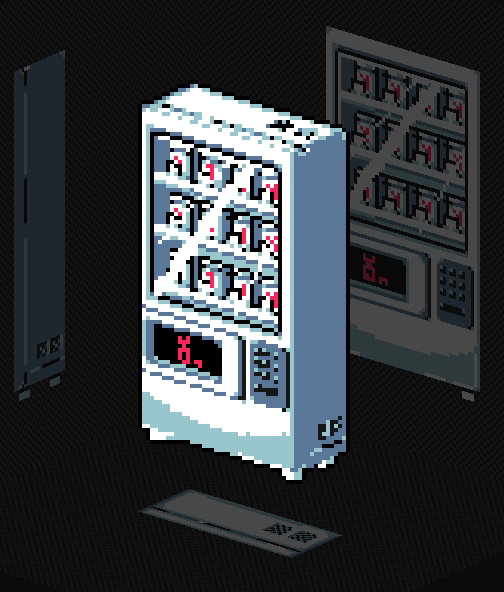
One of the coolest pixel art apps i came accross 🤯 thanks pixel savage
Many Thanks XD
Hay i saw this not too long ago and love! really exited to see how this develops, right now im not understanding how to move selected objects, and copy past does not seem to be working for me, would love to have that working :) also being able to have this it in window mode would be amazing!
Many thanks for your feedbacl Wholesomegomi.
-When u have a selection (make sure the selection has some pixels inside)
Shift+Drag mouse: Move pixels.
Control+Drag mouse: Copy pixels.
Im working to create a nicer user experience.. Working hard on updates, Many thanks.
Could this program import stuff from voxels? It seems like you can technically make a 3D pixel art with it placing every cube one by on (Really tedious on win because of the hard snapping of the camera)
Also I would love to have a larger zoom since when you select one pixel sized column you have to rotate the camera every time you want to fill the selected column.
Also having a customizable key binding for the looks (Maybe on numpad or wherever) would be sooooo comfortable. :)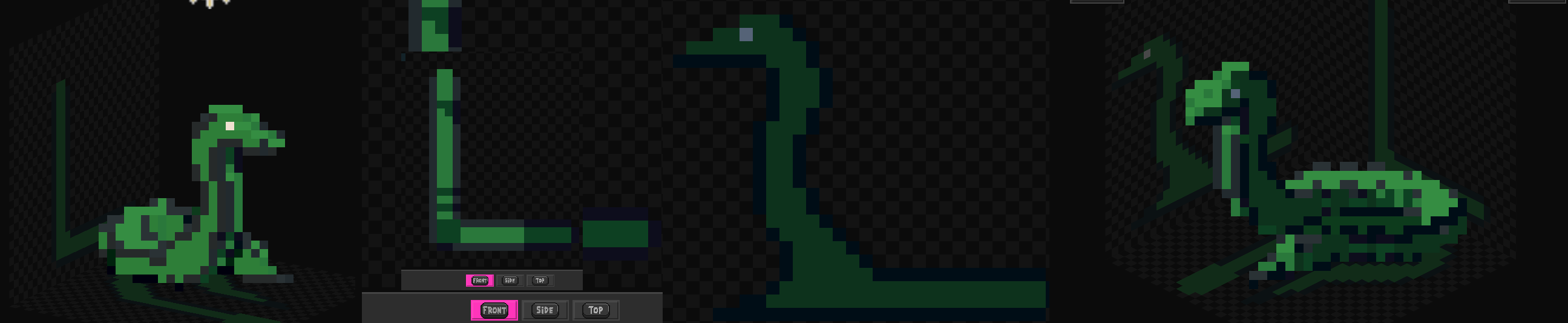
Wow very nice snake :O
Super cool.. Organic shapes aren´t the best for this program, at least atm, Im trying characters to see how can I improve this app.
-Many thanks for your feedback.
Definitely I will relex the snapping view scape, yes.
If u go to views (S SW W...) and u press right left arrows you can actually rotaete the view with the keyboard... I might do the same for Front side top...
Yes, although the app is based on voxels.. Is not using normal Voxel technology, where each individual voxel holds a single color value. In Pixzels this "voxels" hold 6 colored individual faces. So I´m not sure how could be importing Voxel into PixZel. Defenetly I will try out.
Many Thanks Teebor9.
Thanks for the info. If it was a blank voxel just to paint on that could be an amazing boost.
I love this, and have enjoyed the web version since I found it. However, I exclusively use Linux, and emulating the purchased version via Wine results in a significant portion of menus not having any text render. A temporary solution might be for me to download and install the font, if it's available for download somewhere. However, if you could begin compiling it for linux as well it'd be greatly appreciated!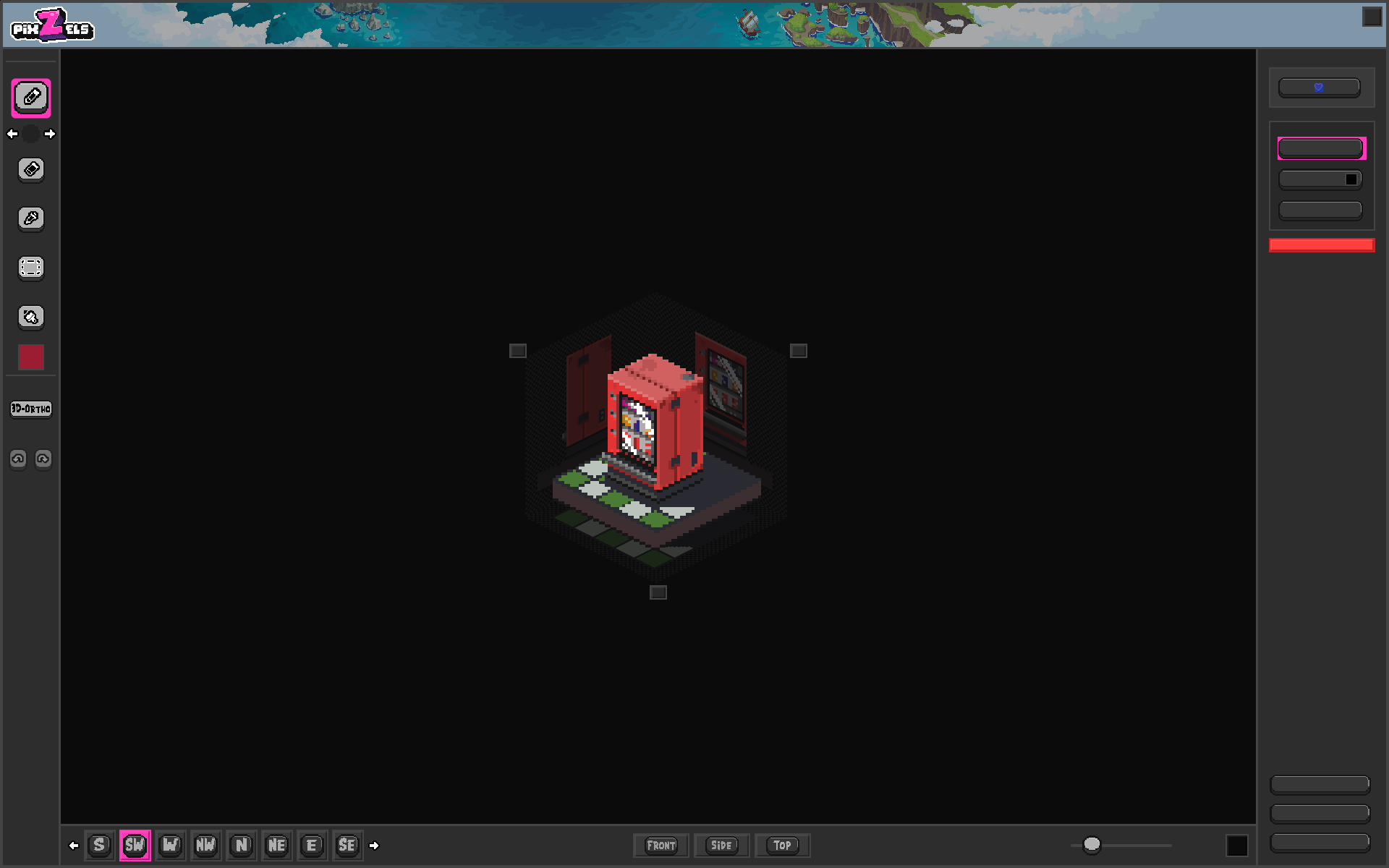
Wow that is how is it on Wine Linux :/ Need to export this into Linux soon yes.
Many thanks :)
Added a Linux Version of PixZels.
Any feedback is very nice for me to find errors for Linux, I have no way to test out Linux version still.
Many Thanks :)
Thanks so much! I just downloaded and installed it. All the text is showing as it should, I believe.
The only errors I ran into were it hanging on trying to close the app, and the "Clear All" button requiring me to press it twice to work. If you'd like, I can send videos if I'm able to reproduce it. Otherwise, this is exciting. Thanks so much!

Many thanks for your feedback, I take account :)
Can I send u a Linux Build so u can text it out and tell me if it works?
Sure! That would be greatly appreciated.
Do u have Discord? or any mail maybe?
Sorry for the delay. I do, though I don't know the best way to share them with you safely via Itch.io lol.
Edit: I added you on Bluesky if you want to message me there.
any intention on having a linux export? like an appimage maybe? very interest in the software.
I got many requests on Linux... I do like Linux a lot, yes I will export next version into it. Many thanks.
I am using windows, played around with it for a bit and have a few observations
when i click export or save as json I get two save dialogs open.
it would be nice to have a button to change the orientation of the object without reuploading the front/top/side. like 'lay this on its back'
right click and drag doesnt change perspective unless i drag quickly which is really inconvenient. it seems the orientation snapping into position is too strong. in the web demo it seems more forgiving but in my windows app the snap is too strong and hard to rotate perspective.
it would be nice to have buttons to see back/bottom/otherside instead of just front/top/side
here is what i made so far, i tried to do a bow but the bow string was very difficult to make. https://imgur.com/a/pjHrIxU
Wow Aubro2.. Many thanks for your feedback, and for your art!
U trully have a good eye on art tools :)
I take all atention at your requests and I add them to the list of to do. Definitely I will need to fix right-click snap (works great on mac ans web), buttons export and buttons missing views.. It´s really important to see what artists need, because I focus on things and I do not see other things.

Amazing ❤️
It is ok for you if I add your book at the hall of fame?
I would be very happy for you to use it - i cleaned up the black line on the spine of the book and reuploaded the gif.
for what its worth this is the art I had that i was starting with. I used someone elses free 16x16 book and upscaled it for my game. the front view i uploaded had the proper X on the eyes but when it gets compressed to isometric the eyes struggle at a lot of angles. Is there a technique you use to make the isometric export angle look proper? i guess i could be pasting the fixed version in the isometric view? I added two new photos to the imgur album posted, one shows in the South view the eyes have an X but in the actual export the angle is slightly different so we just have the lines. this might be an export setting that i have wrong?
Many Thanks I reuploaded the book. ❤️
Based on your pictures.. Maybe the reason because are slightly different is because the book from Front image and the book on isometric there is a camera Tilt, to export the object as true isometric Top_Down. That angle changes prespective on the book illustartion.
Looks great the book, love it :)
This is awesome! Love your work, bought immediately. Very keen to see how this evolves going forward. Top two things I'd love to see is the ability to upload a back image (I might have missed the option) and the ability to upload animation frames for each key angle. Would be awesome to have angles for animations automatically generated that would save SO MUCH TIME, I see the potential already
Hello joeychappel, thanks for your comment. :)
On the program u can upload a 6 images sprites (Front, LSide, Back, RSide, Top and bottom) and the model will be more precisely created.
In my experience it works best to upload just 2 or 3 images, to create the model, which already creates most of the needed 3d models, within the program u can adjust the geometry and colour at any angle. You can export ortho images sprites and go to photoshop or ur desired program to work there if u wish, and upload again into PixZels to export the sprites.
It is best to start with 2 images beacause is not easy to precisely coordinate a orthogonal model using 6 projections, the pixels must be very precisely placed, better let Pixzels make the work.
Hello! Not sure if you meant to reply to me or the person below, but that is a cool feature anyway and definitely what I meant by the first request :D
Just to clarify what I meant with my second point, is I mean it would be cool to be able to upload like 8 animation frames for the front, side and back (each) and have 8 different models be generated for each animation frame, would make animating isometric scenes a lot easier - at least give you frames that you could then edit and touch up later on. I'm sure that it isn't as easy as that, but could be cool to look into
Oh I got ur idea sorry :)
Will be definitely cool to incorporate animation into the app... I need to think what the best approach will be. Many thanks.
Is there a trick for rotating the art on Mac? I'm on a MacBook Pro and when I Control Click / Right Click I'm unable to rotate.
Otherwise I love the app so far.
Mmm strange.. I did not find this issue.. The web version does it work fine for you? Using right click? Many thanks for your report.
Same thing on the web version as well. I havn't tried with a mouse, I'm using just the track pad and ctrl+click if that helps isolate it.
Bought it to support the project, even if I may not get to use it for a while; this is just super cool. How does it handle organic shapes?
Many thanks Lilred ❤️ For characters is not the best atm... There is couple of problems on characters that I need to figure it out how to solve... But the next versions of this app will be improved towards it.
Thanks for the reply! I'm looking forward to seeing how you develop this!
this is actual witchcraft, thank you so much I love it, i would buy it right away if my bank account wasnt locked :'c
Send me your mail or discord holas10.
mr.zoccer is the discord
This is amazing! Seeing the demo animation made me get it right away. I have tried it and it works pretty well but the snapping to the specific angles is sometimes a bit annoying. Is there a way to turn it off?
As a pixelartist this bug is really anoying also... I will refine more the app and find this bug. Sorry for it the app is on hard developement atm... Thanks :)
Oh! This is a bug?
One thing I would love to have (And maybe it would be useful for others as well) if the middle click of the mouse could be pan when held down (Like in blender, illustrator, Aseprite and so on)
Yes this is perfect, many thanks Teebor9!
Do you have a dedicated space for posting the bugs and ideas for this project?
Not really.. I gather info from itch comments... I know this app so much because I tested a lot but I need people feedback, theis computer system, possible bugs, thoughts about the idea... Many thanks
I HAVE BEEN DREAMING ABOUT A SOFTWARE JUST LIKE THIS T_T ITS BEAUTIFUL
Me too XD
Bought just to support--I'm still early on in my own pixeling journey, so I don't have a lot of use for this yet. That being said, I hope to be able to use this in the future! Keep up the good work
Many Thanks Tinygreyhawk ❤️ Help me that a lot . If u need any help on your pixelart jurney I´m always happy to help.
Thank you! :)
This is an amazing point in your pixelarting journey to get this tool. Since the program generates mostly boxy shapes it can help you a lot in understanding structures that will help you later on the manual drawing.
I've encountered a bug of some kind. Not sure if it's just an issue with the demo, and I'm not sure if it's the same on every canvas size, but I'm using a 16x16 canvas.
On certain zoom levels there are pixels that become impossible to colour in. The pencil tool acts as if they're not there (the colour preview isn't even visible when hovering over them).
If I slide the zoom level in and out I can sometimes hit a point where the pencil now recognises one of the "dead" pixels and I can colour it in.. So I'm having to constantly zoom in and out trying to find zoom levels to fill in the dead pixels.
True, many thanks... I encounter this bug also... Curently I use bucket tool to fill this gap, but it is very anoying... As a pixelartist is my main concern because I want a responsive tool. That is my #1st bug priority. Many thanks Sancosity. Hope to clean up this bug during this work week..
This was my experience in painting a 8x8 solid red circle. I could complete one side just fine but the 3D approximation would get real janky on either of the other sides
On my experience is good to work using selections (add deleted or paint pixels) to complete the model, because working using just images projected requires precision on the pixels to get the desired result.
Woah this looks really amazing. Loads of potential with this tool. Quick question, can you control the camera view for when you're exporting 8 directions or 16 direction angles?
I'm asking because I tend to experiment with fps and would like to match the angles of the 8 directional sprites for fps style games. The images you've shown look for more "top-down" or "isometric" angles and I was curious.
Still an amazing tool though. I'm not gonna lie I am impressed with what you've achieved this far and can't wait to see this grow as it updates.
Yes Interesting.. Thanks to point that out... At the moment there export 8 directions and 16 directions, but yes are isometric top Down... Also there is orthogrphic export (front sides back top and down)... that I used to reimport back to Pixzels to create the model... Also I added a random angle snapshot... But I did not thought about 8 directions orthographic... That would be really handy for models on pixleart to be rendered 8 diretions for a fps game... Same as Doom directional sprites rotation. Defenetly I will add this export on next future update... Thanks PsychoJack!
Hello pixel_Salvaje. Thanks for responding. Much appreciated for hearing me out and for considering the potential update. I think this is a really amazing tool.
Having played a lot of Doom and dabbled in some modding, this tool would perfectly fit right in the alley for those looking for an extremely handy toolset for sprite work that demand a lot of sprites of that nature.
As a possible hypothetical addition to the orthographic rotation, is it possible to also have it where you can get sprites from a top view orthographic? So if you wanted 8 direction sprites from a top or bottom view for those who want to really spice up their sprite work now that tools like this enable more faster workflows?
I'm asking because Doom style sprites look amazing and detailed, and those are only 8 directions in a 360° left to right fashion. But what about from the top or bottom view for those looking to incorporate sprites in more 3d environments, or those with more complex elevation or areas. Just something I have been thinking about with this, but feel free to tell me otherwise if its unrealistic in any way. I'm already happy to see a tool like this exist. It's the only one of its kind.
Once I have tried a rotation sprite doom system, including the top and down... After some days of work I could not get nice results... Player mostly sees the enemy from its sides... and when player see the enemy from top is too much of a change of sprite... Change sprites from each sides works good because are small variations changes... but changing sprites from side to top there is too much of a jump... I could not get nice results by myself... Maybe need to think more about.
Amazing tool! I wonder if the back image feature is included? Because you show only 3 images (Top, Front, Side), does the back image is included in the tool? Thank you Kenney.
Yes, the back image is taken into account when building the 3D model. Although a model can be constructed using only two or three orthogonal images with decent precision, I’ve found that using three specific views (Top, Front, and Side) is more practical and effective for avoiding mistakes instead of working all 6 orthogonal views.
Additionally, in Pixel Salvaje, I’ve ensured that if a user paints a back or bottom image after the initial model creation, those images are then integrated to refine the final 3D output.
A better name would be piXYZels...
You nail it Goliard!... Whish to know that one month ago. XD